
Innix product
Innix product
Innix product
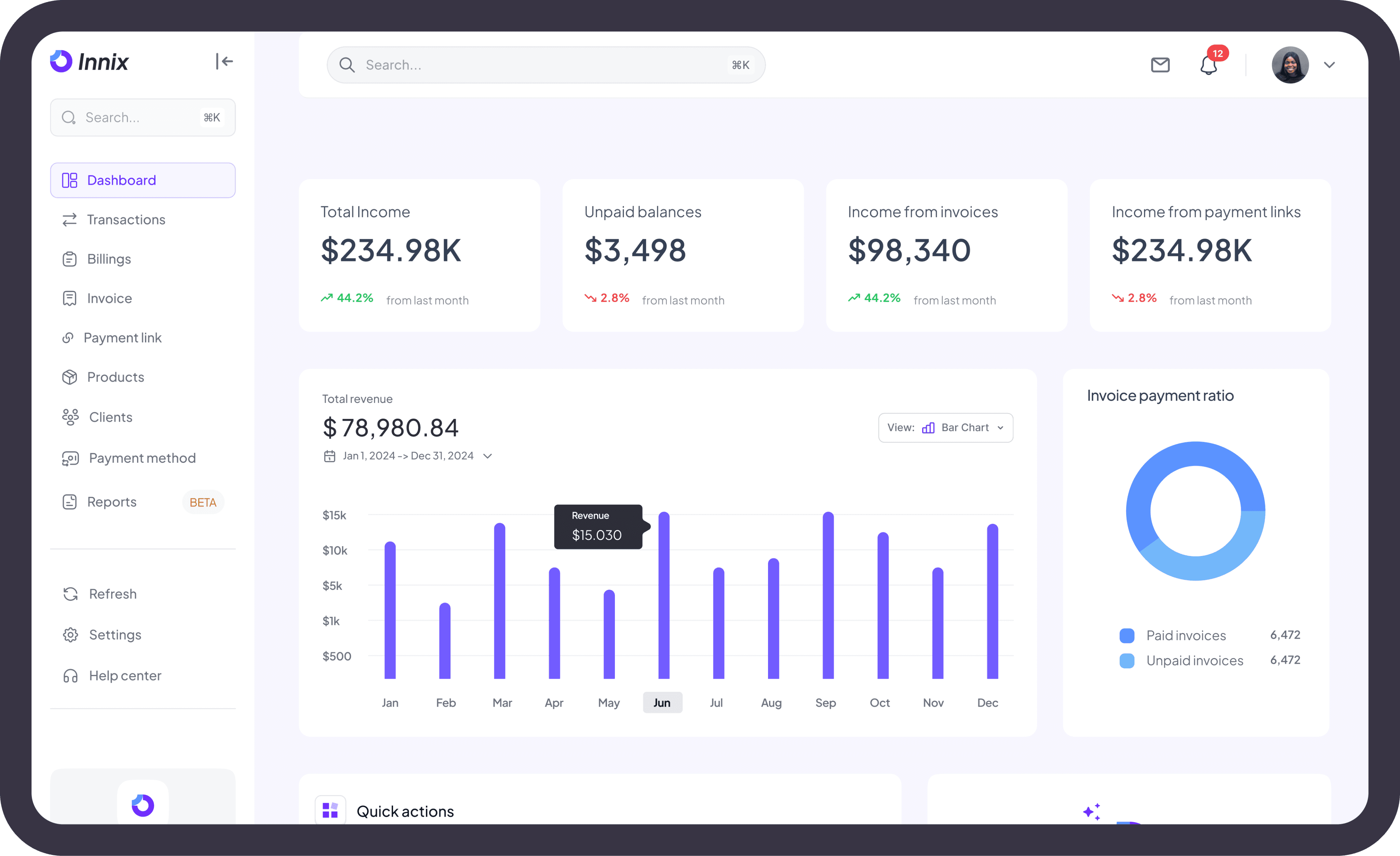
Quick actions
Create an invoice
Create a payment link
Add a new client
Add a product
Introduction:
Introduction:
Introduction:
Innix is an innovative invoicing platform that empowers individuals and businesses to streamline their billing processes. With AI-powered features, manual invoice creation options, and integrated payment solutions, Innix provides a flexible, efficient, and user-friendly experience for managing invoices and payments
Innix is an innovative invoicing platform that empowers individuals and businesses to streamline their billing processes. With AI-powered features, manual invoice creation options, and integrated payment solutions, Innix provides a flexible, efficient, and user-friendly experience for managing invoices and payments
Innix is an innovative invoicing platform that empowers individuals and businesses to streamline their billing processes. With AI-powered features, manual invoice creation options, and integrated payment solutions, Innix provides a flexible, efficient, and user-friendly experience for managing invoices and payments
Project Objective
Project Objective
Project Objective
The primary objective of designing the innix product is to
Enhance efficiency: Simplify invoice creation and management and enable faster invoice generation using AI, voice commands, or image uploads.
Improve Tracking: Automate invoice tracking and provide real-time updates.Simplify the process of marking invoices as paid or partially paid.
Increase Engagement: Implement automated reminders for due payments. Allow businesses to request deposits or partial payments easily.
User-Centric Design: Optimize the interface for intuitive navigation and also cater to businesses of various sizes and sectors with customizable features.
The primary objective of designing the innix product is to
Enhance efficiency: Simplify invoice creation and management and enable faster invoice generation using AI, voice commands, or image uploads.
Improve Tracking: Automate invoice tracking and provide real-time updates.Simplify the process of marking invoices as paid or partially paid.
Increase Engagement: Implement automated reminders for due payments. Allow businesses to request deposits or partial payments easily.
User-Centric Design: Optimize the interface for intuitive navigation and also cater to businesses of various sizes and sectors with customizable features.
The primary objective of designing the innix product is to
Enhance efficiency: Simplify invoice creation and management and enable faster invoice generation using AI, voice commands, or image uploads.
Improve Tracking: Automate invoice tracking and provide real-time updates.Simplify the process of marking invoices as paid or partially paid.
Increase Engagement: Implement automated reminders for due payments. Allow businesses to request deposits or partial payments easily.
User-Centric Design: Optimize the interface for intuitive navigation and also cater to businesses of various sizes and sectors with customizable features.
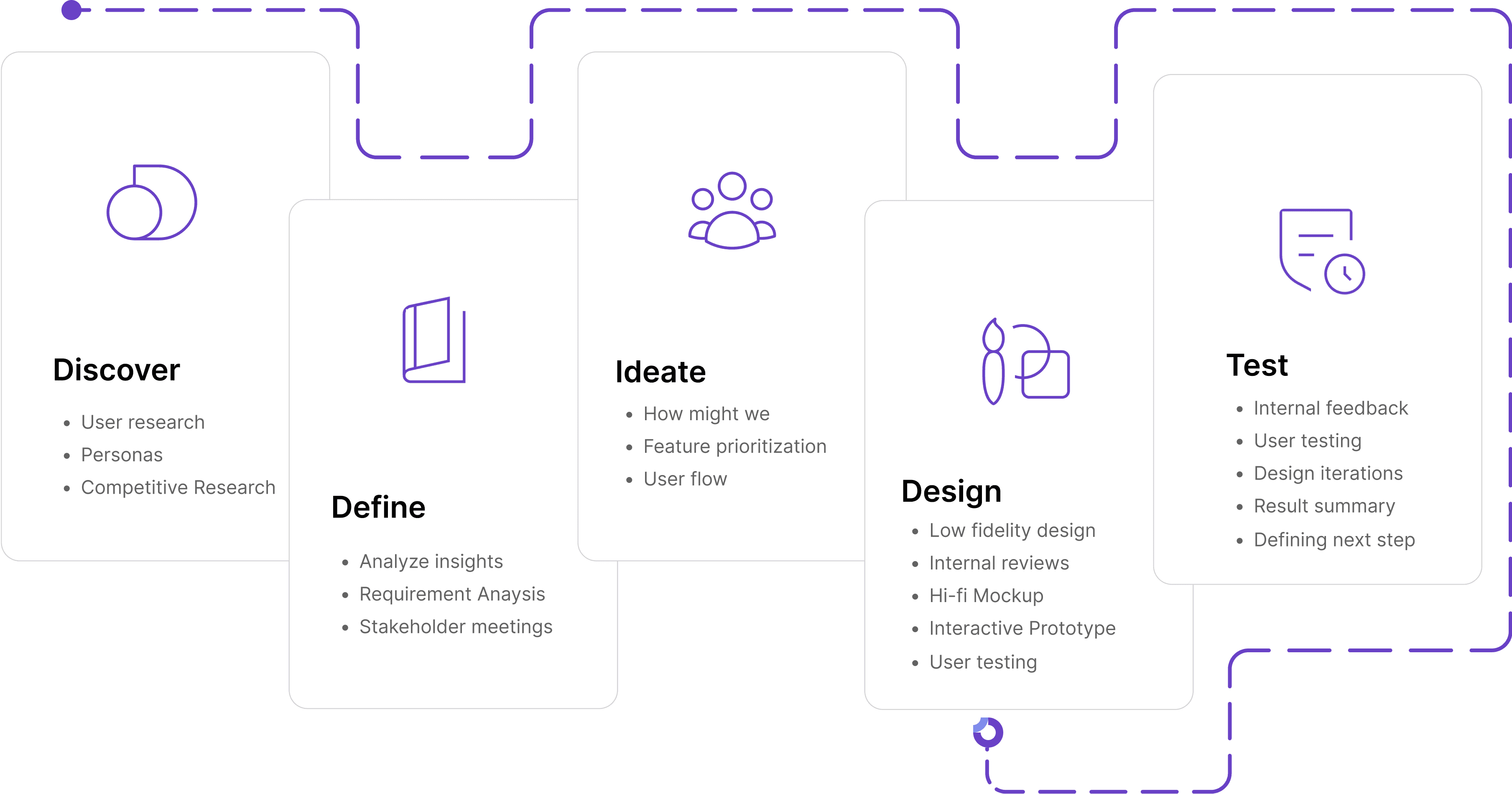
Design Process
Design Process
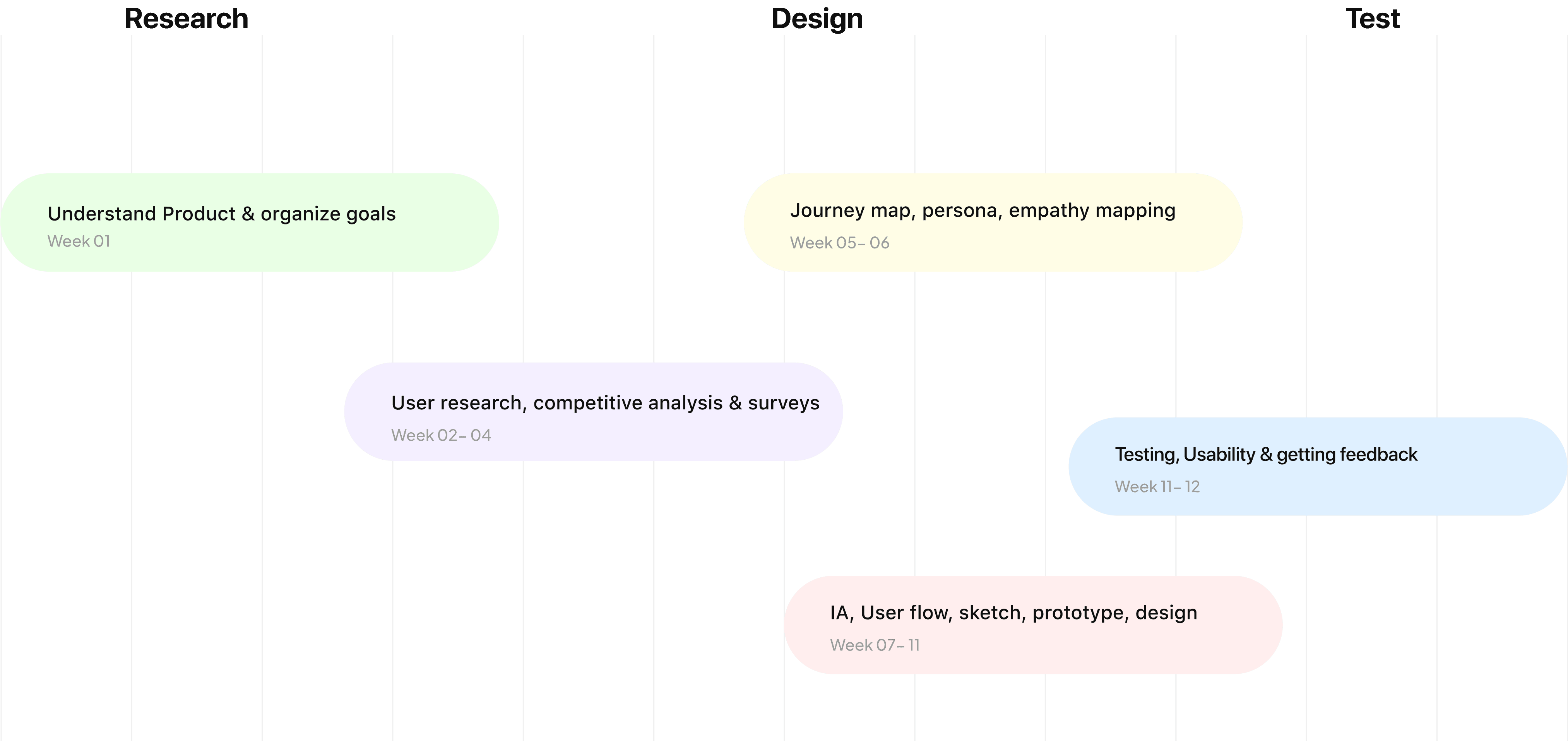
Project Timeline
Project Timeline
Project Timeline
User Research Section
User Research Section
User Research Section
Ideation Process Section
Ideation Process Section
Ideation Process Section
Low fidelity wireframes
Low fidelity wireframes
Low fidelity wireframes
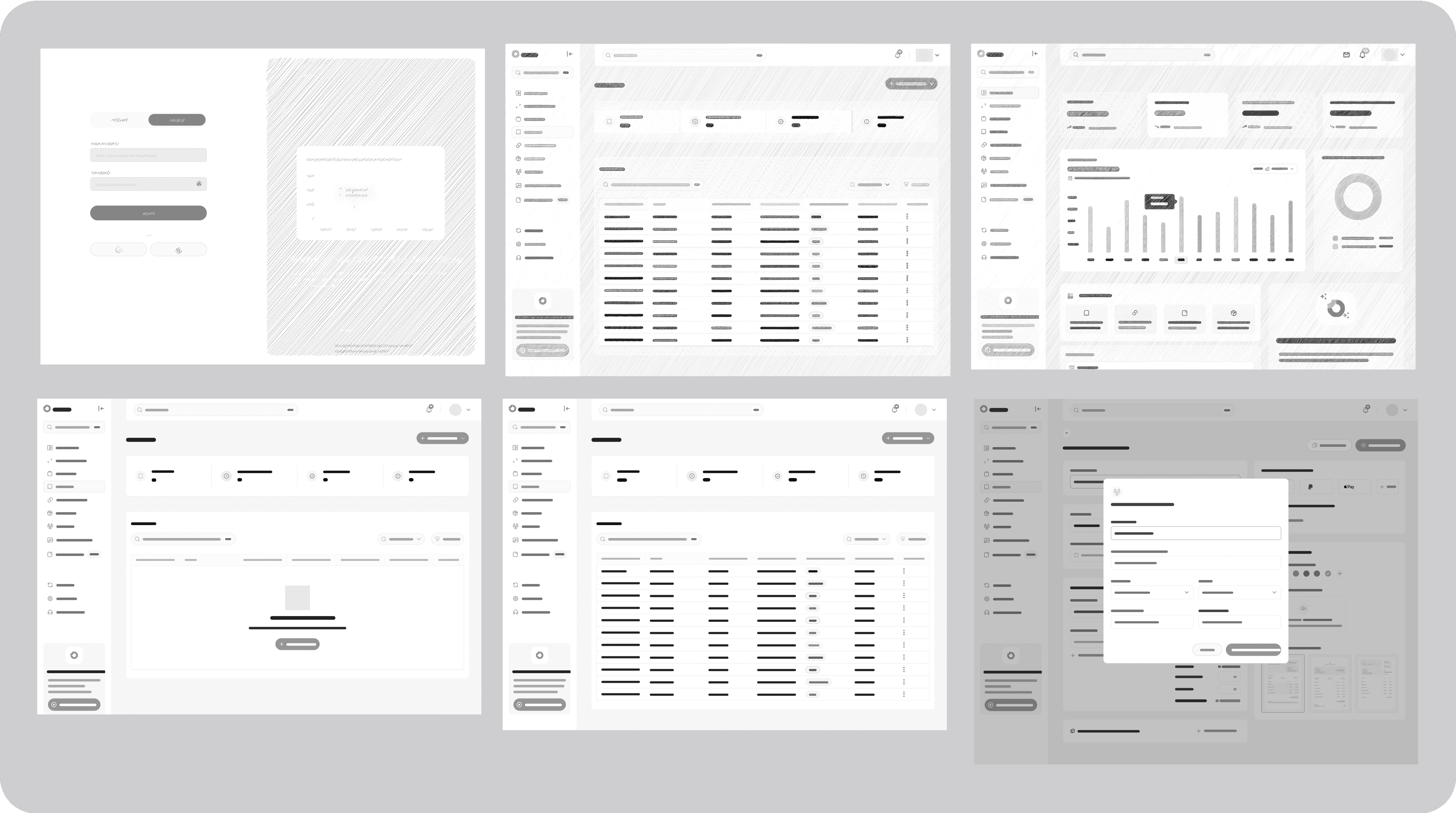
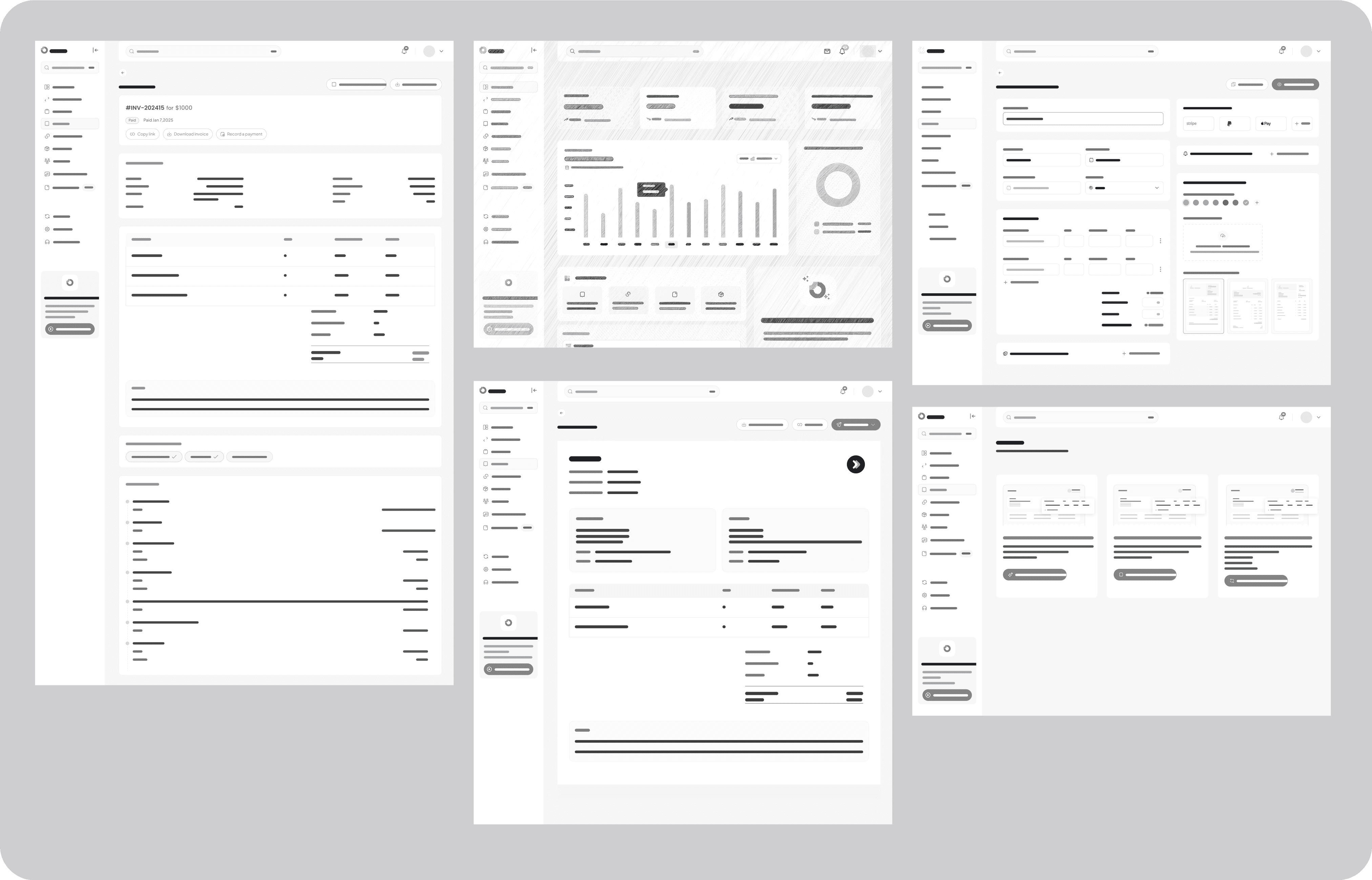
After defining the core user flows, I created low-fidelity wireframes to visualize the structure and layout before adding visual details and colours.
After defining the core user flows, I created low-fidelity wireframes to visualize the structure and layout before adding visual details and colours.
After defining the core user flows, I created low-fidelity wireframes to visualize the structure and layout before adding visual details and colours.
Design system
Design system
Design system
To maintain consistency across the Innix product, I developed a design system covering typography, colors, iconography, buttons, and components which i cant possibly add all here.
To maintain consistency across the Innix product, I developed a design system covering typography, colors, iconography, buttons, and components which i cant possibly add all here.
To maintain consistency across the Innix product, I developed a design system covering typography, colors, iconography, buttons, and components which i cant possibly add all here.
Deep purple
Deep purple
#D5FF5F
Ocean blue
Ocean blue
#5B93FF
Pale lilac
Pale lilac
#F7F6FE
White
White
#FFFFFF
Aa
Aa
Aa
Plus Jakarta Sans
Plus Jakarta Sans
Jakarta Sans is a font family which combines geometric sans serif styles with inspiration from Neuzit Grotesk and 1930s grotesque fonts.
Jakarta Sans is a font family which combines geometric sans serif styles with inspiration from Neuzit Grotesk and 1930s grotesque fonts.
Icons
Icons
Typography
Typography
SemiBold
SemiBold
Headline 1
Headline 1
48 px
48 px
Bold
Bold
Headline 2
Headline 2
32 px
32 px
Bold
Bold
Headline 2
Headline 2
27 px
27 px
Medium
Medium
Headline 3
Headline 3
24 px
24 px
Semibold
Semibold
Body text 1
Body text 1
18 px
18 px
Medium
Medium
Body text 2
16 px
16 px
Regular
Regular
Body text 4
14 px
14 px
Regular
Regular
Body text 4
12 px
12 px
Bold
Bold
Body text 1
Body text 1
20 px
20 px
Bold
Bold
Headline 4
Headline 4
22 px
22 px
Usability
Usability
Usability
Testing
Testing
Testing

Usability testing
Usability testing
Usability testing
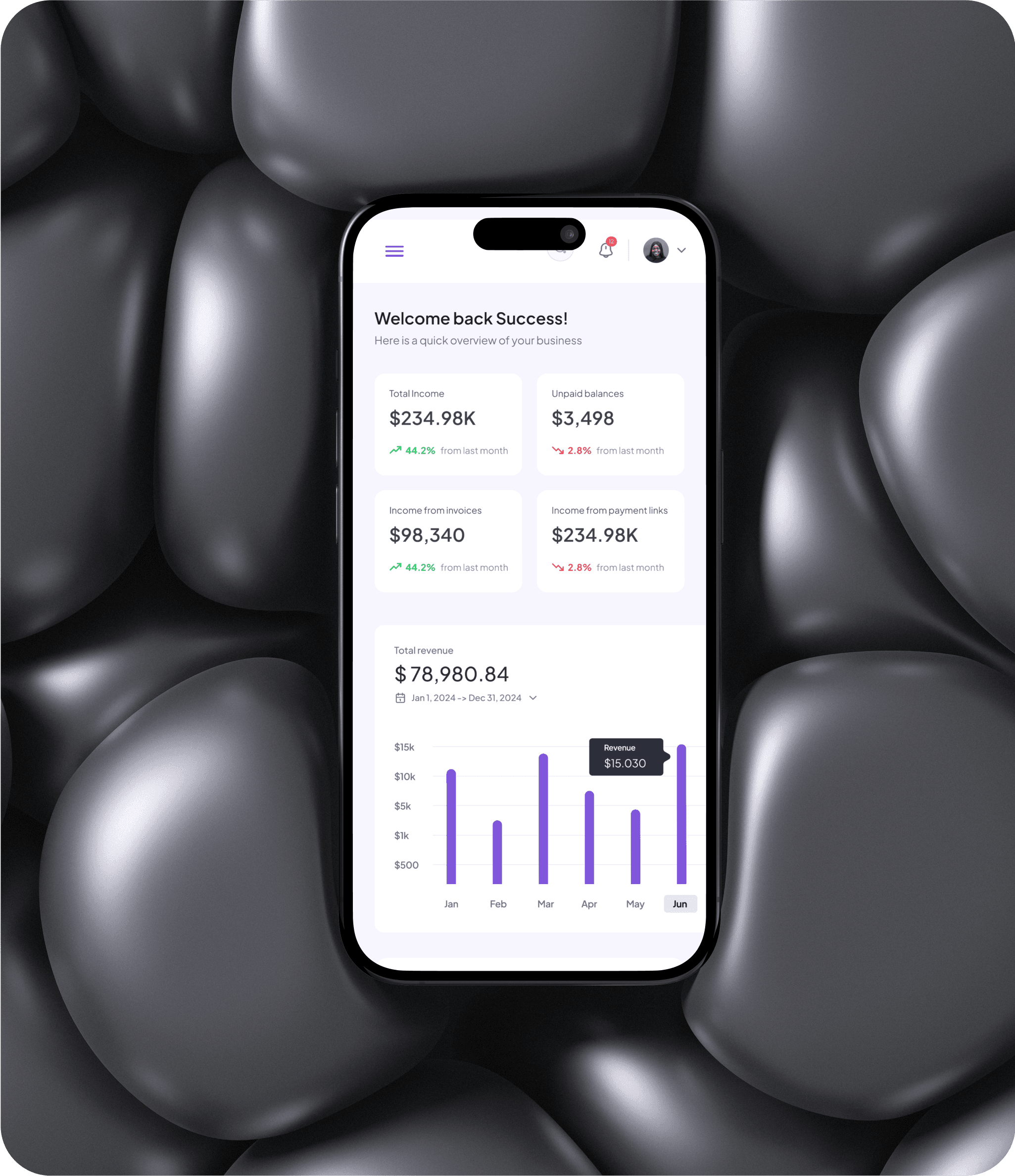
After designing the high-fidelity wireframes, I conducted usability testing to evaluate the product's usability and identify pain points. Five participants tested the prototype while performing key tasks such as creating an invoice, setting reminders, and tracking payments.
After designing the high-fidelity wireframes, I conducted usability testing to evaluate the product's usability and identify pain points. Five participants tested the prototype while performing key tasks such as creating an invoice, setting reminders, and tracking payments.
After designing the high-fidelity wireframes, I conducted usability testing to evaluate the product's usability and identify pain points. Five participants tested the prototype while performing key tasks such as creating an invoice, setting reminders, and tracking payments.
Study Overview :
Study Overview :
Objective: The primary objective of the usability study is to evaluate the designed user interface and features of the Innix invoicing feature to ensure that it provides a satisfying user experience.
Participants: 5 participants representing the target audience of the Innix app, including both genders were recruited for testing purposes.
Date and Location: The usability study took place over the course of one week on Google meet.
Study Facilitators: The study was facilitated by me.
Objective: The primary objective of the usability study is to evaluate the designed user interface and features of the Innix invoicing feature to ensure that it provides a satisfying user experience.
Participants: 5 participants representing the target audience of the Innix app, including both genders were recruited for testing purposes.
Date and Location: The usability study took place over the course of one week on Google meet.
Study Facilitators: The study was facilitated by me.
Objective: The primary objective of the usability study is to evaluate the designed user interface and features of the Innix invoicing feature to ensure that it provides a satisfying user experience.
Participants: 5 participants representing the target audience of the Innix app, including both genders were recruited for testing purposes.
Date and Location: The usability study took place over the course of one week on Google meet.
Study Facilitators: The study was facilitated by me.
Key Performance Indicators (KPIs):
Key Performance Indicators (KPIs):
Task Success Rate: The Task success rate was measured for various user tasks. The KPI for this metric was set at a minimum of 85%, and the actual success rate averaged 92%.
Time on Task: The KPI for time on task was set to ensure that tasks were completed within a reasonable time frame. Tasks were considered efficient if completed within a set time limit (e.g., under 3 minutes), and the actual completion times met these criteria.
User Satisfaction : User satisfaction was measured using a 5-point Likert scale (1 - Very Dissatisfied to 5 - Very Satisfied). The KPI was set at an average satisfaction rating of 4.0,
Task Success Rate: The Task success rate was measured for various user tasks. The KPI for this metric was set at a minimum of 85%, and the actual success rate averaged 92%.
Time on Task: The KPI for time on task was set to ensure that tasks were completed within a reasonable time frame. Tasks were considered efficient if completed within a set time limit (e.g., under 3 minutes), and the actual completion times met these criteria.
User Satisfaction : User satisfaction was measured using a 5-point Likert scale (1 - Very Dissatisfied to 5 - Very Satisfied). The KPI was set at an average satisfaction rating of 4.0,
Task Success Rate: The Task success rate was measured for various user tasks. The KPI for this metric was set at a minimum of 85%, and the actual success rate averaged 92%.
Time on Task: The KPI for time on task was set to ensure that tasks were completed within a reasonable time frame. Tasks were considered efficient if completed within a set time limit (e.g., under 3 minutes), and the actual completion times met these criteria.
User Satisfaction : User satisfaction was measured using a 5-point Likert scale (1 - Very Dissatisfied to 5 - Very Satisfied). The KPI was set at an average satisfaction rating of 4.0,
Insights from Usability Testing
Insights from Usability Testing
Insights from Usability Testing
Positive Feedbacks
Positive Feedbacks
✅ "Creating an invoice was really simple!" (5/5 users)
"I like how easy it was to generate an invoice. The AI-assisted feature and image upload option seem like they would save a lot of time."
✅ "Creating an invoice was really simple!" (5/5 users)
"I like how easy it was to generate an invoice. The AI-assisted feature and image upload option seem like they would save a lot of time."
✅ "Creating an invoice was really simple!" (5/5 users)
"I like how easy it was to generate an invoice. The AI-assisted feature and image upload option seem like they would save a lot of time."
✅ "Scheduling invoices is a great feature." (3/5 users)
"I can see how this would help me manage payments better. It’s nice to have the option to schedule invoices in advance."
✅ "Scheduling invoices is a great feature." (3/5 users)
"I can see how this would help me manage payments better. It’s nice to have the option to schedule invoices in advance."
✅ "Scheduling invoices is a great feature." (3/5 users)
"I can see how this would help me manage payments better. It’s nice to have the option to schedule invoices in advance."
✅ "Automated reminders seem useful." (4/5 users)
"It’s great that the system would send reminders instead of me having to follow up manually."
✅ "Automated reminders seem useful." (4/5 users)
"It’s great that the system would send reminders instead of me having to follow up manually."
✅ "Automated reminders seem useful." (4/5 users)
"It’s great that the system would send reminders instead of me having to follow up manually."
✅ "The dashboard layout is clear and well-organized." (4/5 users)
"Everything is easy to find. I can quickly see which invoices are pending, paid, or overdue without too many clicks."
✅ "The dashboard layout is clear and well-organized." (4/5 users)
"Everything is easy to find. I can quickly see which invoices are pending, paid, or overdue without too many clicks."
✅ "The dashboard layout is clear and well-organized." (4/5 users)
"Everything is easy to find. I can quickly see which invoices are pending, paid, or overdue without too many clicks."
✅ "Seeing when a client has viewed an invoice is helpful." (3/5 users)
"I like that I’d be able to know when a client has seen the invoice so I don’t have to follow up unnecessarily."
✅ "Seeing when a client has viewed an invoice is helpful." (3/5 users)
"I like that I’d be able to know when a client has seen the invoice so I don’t have to follow up unnecessarily."
✅ "Seeing when a client has viewed an invoice is helpful." (3/5 users)
"I like that I’d be able to know when a client has seen the invoice so I don’t have to follow up unnecessarily."
✅ "Having different payment options is a plus." (3/5 users)
"I like that I’d be able to offer multiple payment options like bank transfer or Stripe—it makes things more flexible."
✅ "Having different payment options is a plus." (3/5 users)
"I like that I’d be able to offer multiple payment options like bank transfer or Stripe—it makes things more flexible."
✅ "Having different payment options is a plus." (3/5 users)
"I like that I’d be able to offer multiple payment options like bank transfer or Stripe—it makes things more flexible."
✅ "Customizing invoices with my logo and brand colors is a nice touch." (3/5 users)
"It makes the invoices look more professional. I’d love to have more customization options for the layout."
✅ "Customizing invoices with my logo and brand colors is a nice touch." (3/5 users)
"It makes the invoices look more professional. I’d love to have more customization options for the layout."
✅ "Customizing invoices with my logo and brand colors is a nice touch." (3/5 users)
"It makes the invoices look more professional. I’d love to have more customization options for the layout."
Negative Feedbacks & Areas for Improvement
Negative Feedbacks & Areas for Improvement
❌ "I want to edit the AI generated invoices." (3/5 users)
""I like the AI-generated invoices, but I wish I could customize the details before sending them out."
❌ "I want to edit the AI generated invoices." (3/5 users)
""I like the AI-generated invoices, but I wish I could customize the details before sending them out."
❌ "I want to edit the AI generated invoices." (3/5 users)
""I like the AI-generated invoices, but I wish I could customize the details before sending them out."
❌ "I didn't know i could generate invoice initially." (2/5 users)
"As a first time user, I didn’t even know the app has a feature to generate invoice with AI.
❌ "I didn't know i could generate invoice initially." (2/5 users)
"As a first time user, I didn’t even know the app has a feature to generate invoice with AI.
❌ "I didn't know i could generate invoice initially." (2/5 users)
"As a first time user, I didn’t even know the app has a feature to generate invoice with AI.
❌ "It wasn’t clear how to mark an invoice as paid." (3/5 users)
"I had trouble figuring out how to record a payment on an invoice. Maybe a clearer button or better labeling would help."
❌ "It wasn’t clear how to mark an invoice as paid." (3/5 users)
"I had trouble figuring out how to record a payment on an invoice. Maybe a clearer button or better labeling would help."
❌ "It wasn’t clear how to mark an invoice as paid." (3/5 users)
"I had trouble figuring out how to record a payment on an invoice. Maybe a clearer button or better labeling would help."
❌ "The scheduling feature wasn’t obvious." (2/5 users)
"I didn’t even realize I could schedule an invoice until later. A tooltip or small guide would make it easier to find."
❌ "The scheduling feature wasn’t obvious." (2/5 users)
"I didn’t even realize I could schedule an invoice until later. A tooltip or small guide would make it easier to find."
❌ "The scheduling feature wasn’t obvious." (2/5 users)
"I didn’t even realize I could schedule an invoice until later. A tooltip or small guide would make it easier to find."
❌ "I want to draft invoices offline and sync them later." (1/5 users)
"Sometimes I don’t have internet, but I still need to create invoices. It would be great if I could work offline and sync later."
❌ "I want to draft invoices offline and sync them later." (1/5 users)
"Sometimes I don’t have internet, but I still need to create invoices. It would be great if I could work offline and sync later."
❌ "I want to draft invoices offline and sync them later." (1/5 users)
"Sometimes I don’t have internet, but I still need to create invoices. It would be great if I could work offline and sync later."
❌ "Requesting a deposit was a bit confusing." (4/5 users)
"I struggled to find the partial payment request option. It should be more visible, with a clear breakdown of how much is due."
❌ "Requesting a deposit was a bit confusing." (4/5 users)
"I struggled to find the partial payment request option. It should be more visible, with a clear breakdown of how much is due."
❌ "Requesting a deposit was a bit confusing." (4/5 users)
"I struggled to find the partial payment request option. It should be more visible, with a clear breakdown of how much is due."
Design iteration *
Design iteration *
Design iteration *
Design iteration *
Design iteration *
Design iteration *
Design iteration *
Design iteration *
Design iteration *
Design iteration *
Design iteration *
Design iteration *
Design iteration *
Design iteration *
Design iteration *
Design iteration *
Design iteration *
Design iteration *
Design iteration *
Design iteration *
Design iteration *
Ideate *
Ideate *
Ideate *
Ideate *
Design iterations
Design iterations
Design iterations
After analyzing the insights from the usability testing, I focused on the high priority pain point areas and began to redesign and improve the UI of the features that needed improvements. The iterations focused on improving clarity, flexibility, and ease of use.
After analyzing the insights from the usability testing, I focused on the high priority pain point areas and began to redesign and improve the UI of the features that needed improvements. The iterations focused on improving clarity, flexibility, and ease of use.
1. Improved AI Invoice Customization
1. Improved AI Invoice Customization
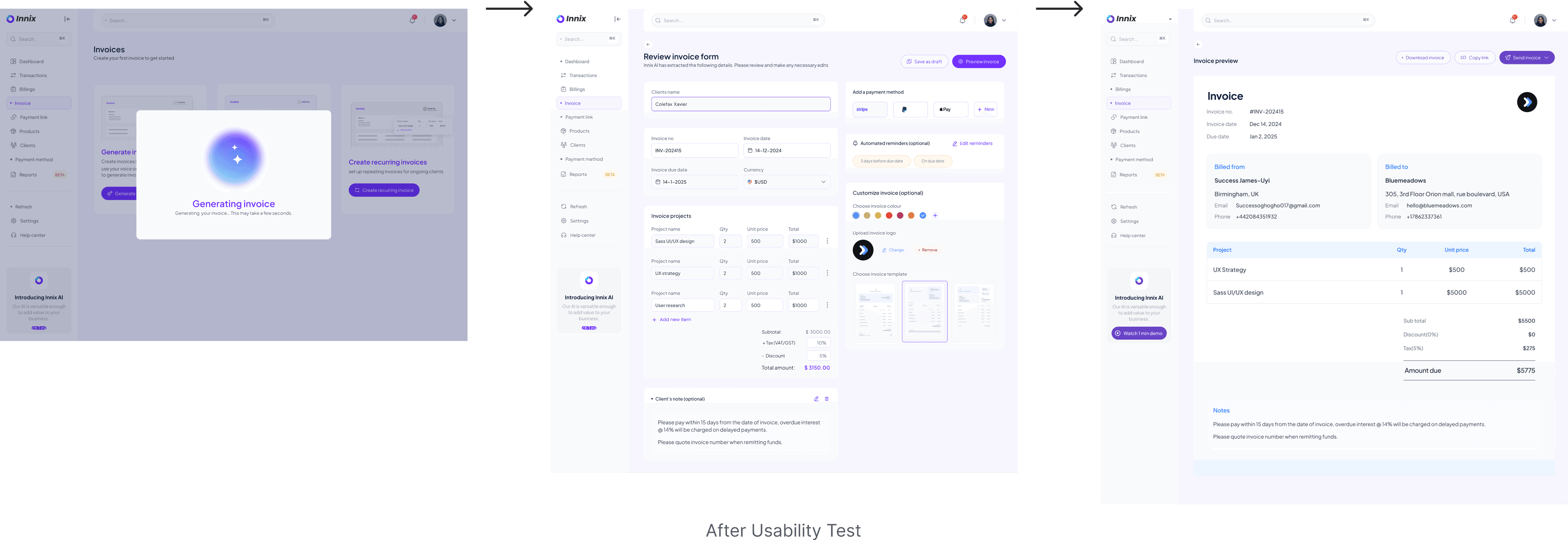
Feedback: 3/5 participants wanted more control over AI-generated invoices, allowing them to modify details before finalizing.
Feedback: 3/5 participants wanted more control over AI-generated invoices, allowing them to modify details before finalizing.
Feedback: 3/5 participants wanted more control over AI-generated invoices, allowing them to modify details before finalizing.
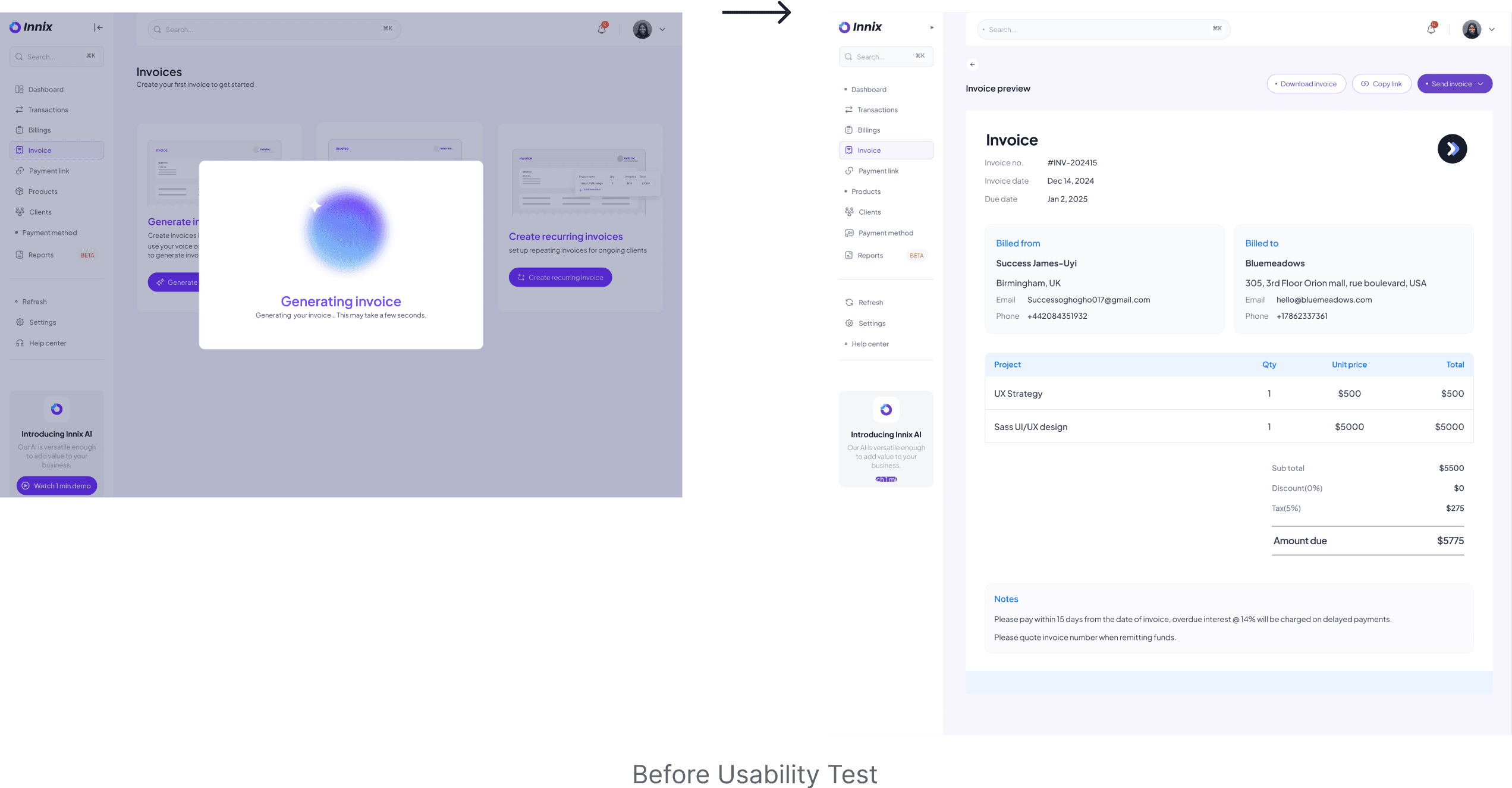
Iteration: I added an editable preview screen where users can review and adjust the generated invoice before sending it.
Iteration: I added an editable preview screen where users can review and adjust the generated invoice before sending it.
2.Improved Feature Discovery for AI Invoice Generation
2.Improved Feature Discovery for AI Invoice Generation
Feedback: 3/5 participants were unaware that they could generate invoices with AI, as the feature was not immediately visible.
Feedback: 3/5 participants were unaware that they could generate invoices with AI, as the feature was not immediately visible.
Feedback: 3/5 participants were unaware that they could generate invoices with AI, as the feature was not immediately visible.
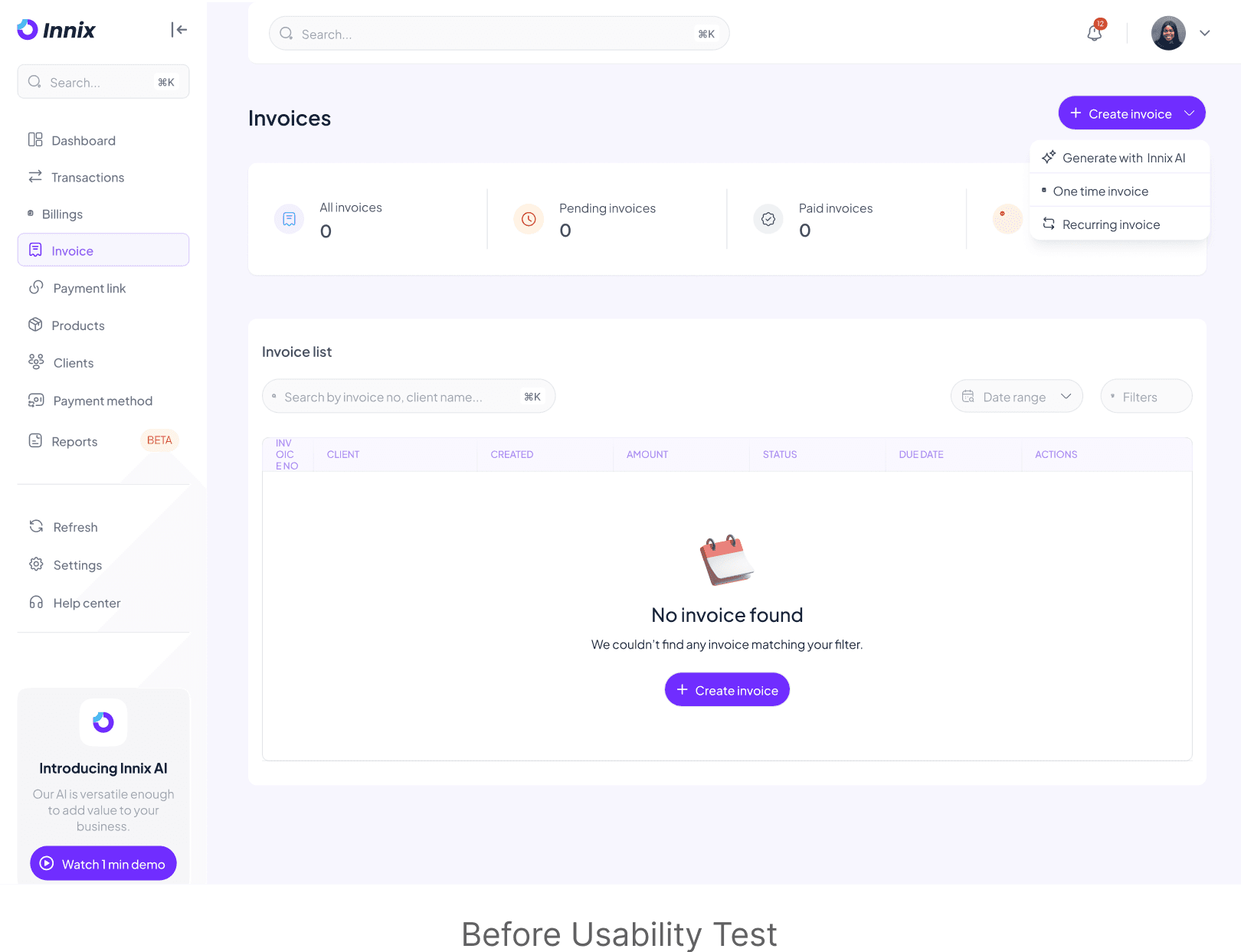
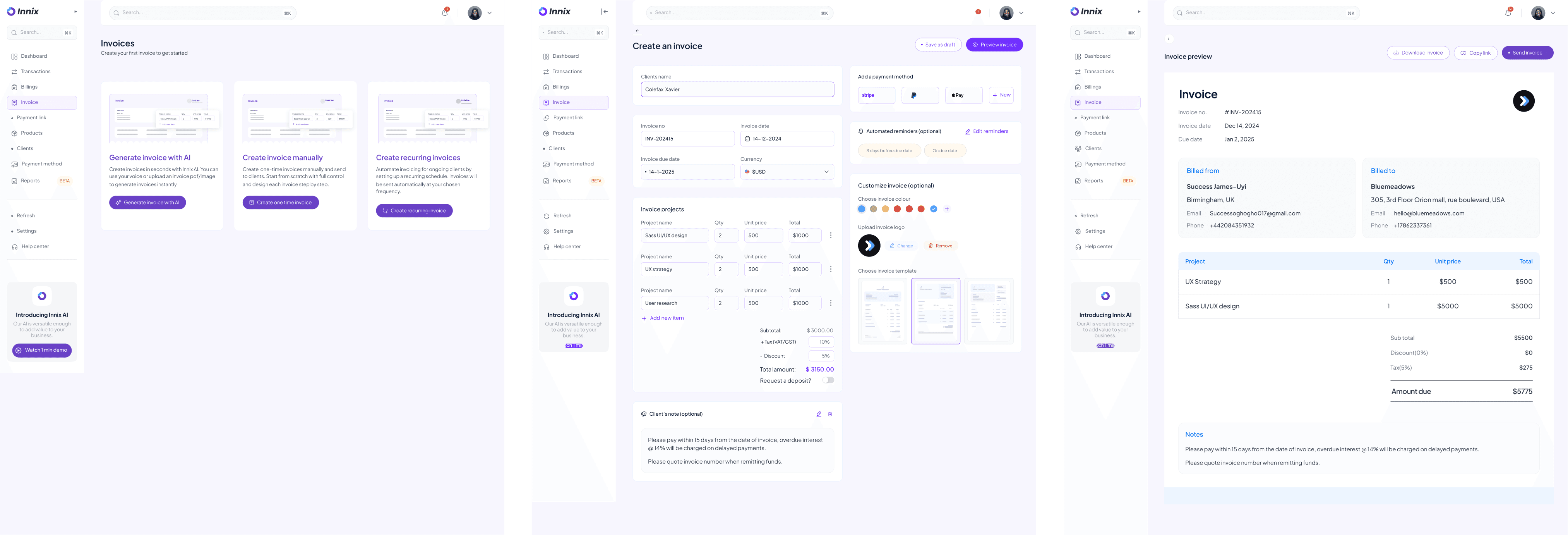
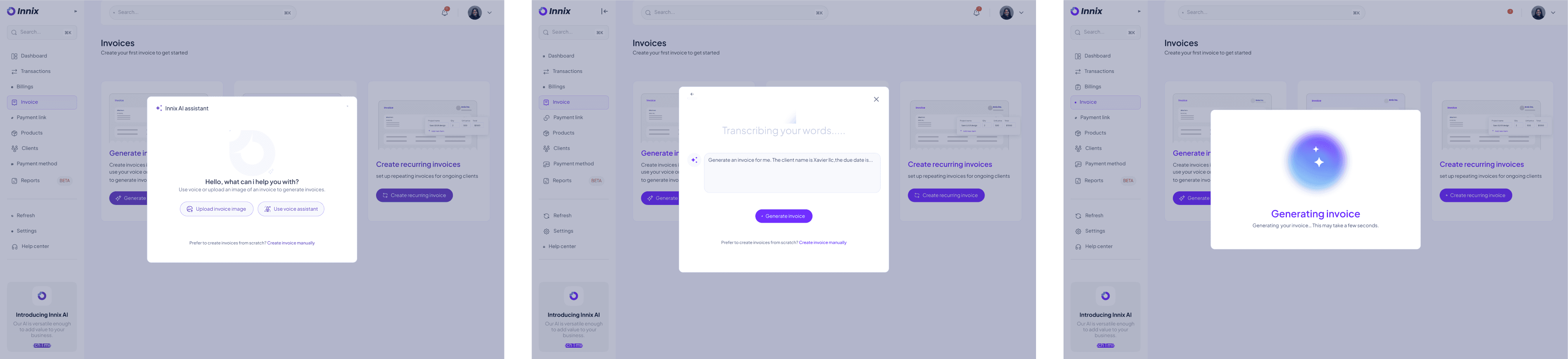
Iteration: I redesigned the empty state by replacing the previous minimal layout with three distinct action cards for AI-generated, manual, and recurring invoices. Each card includes a description and an engaging visual to clearly communicate its function. This ensures that first-time users immediately understand their options, making AI invoice generation more discoverable and intuitive.
Iteration: I redesigned the empty state by replacing the previous minimal layout with three distinct action cards for AI-generated, manual, and recurring invoices. Each card includes a description and an engaging visual to clearly communicate its function. This ensures that first-time users immediately understand their options, making AI invoice generation more discoverable and intuitive.
Iteration: I redesigned the empty state by replacing the previous minimal layout with three distinct action cards for AI-generated, manual, and recurring invoices. Each card includes a description and an engaging visual to clearly communicate its function. This ensures that first-time users immediately understand their options, making AI invoice generation more discoverable and intuitive.
3.Improved flow for Invoice partial payment request
3.Improved flow for Invoice partial payment request
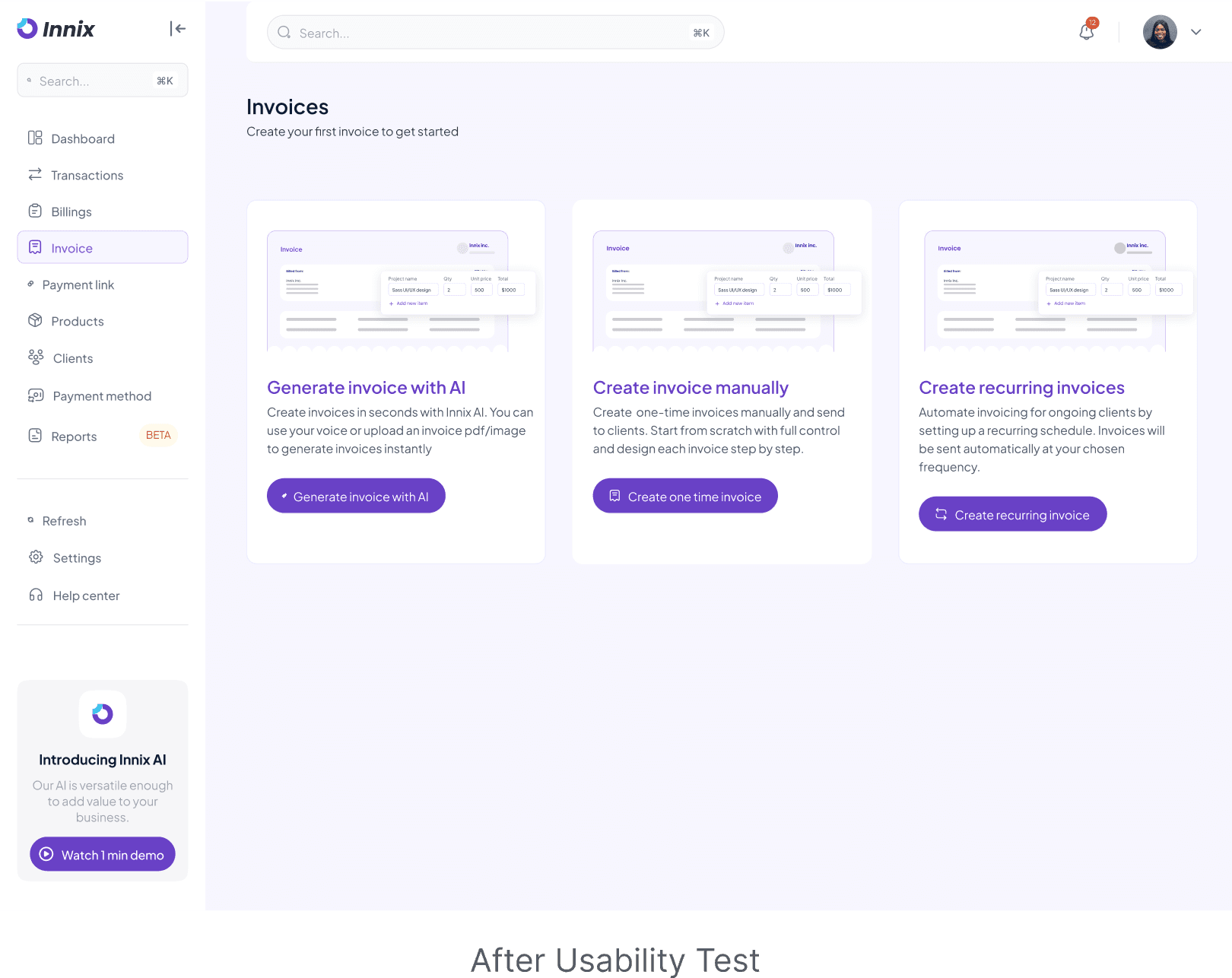
Feedback: 3/5 participants did not immediately notice they could request a deposit while creating an invoice. They only discovered it later in the invoice details page, making the process feel disconnected from invoice creation.
Feedback: 3/5 participants did not immediately notice they could request a deposit while creating an invoice. They only discovered it later in the invoice details page, making the process feel disconnected from invoice creation.
Feedback: 3/5 participants did not immediately notice they could request a deposit while creating an invoice. They only discovered it later in the invoice details page, making the process feel disconnected from invoice creation.
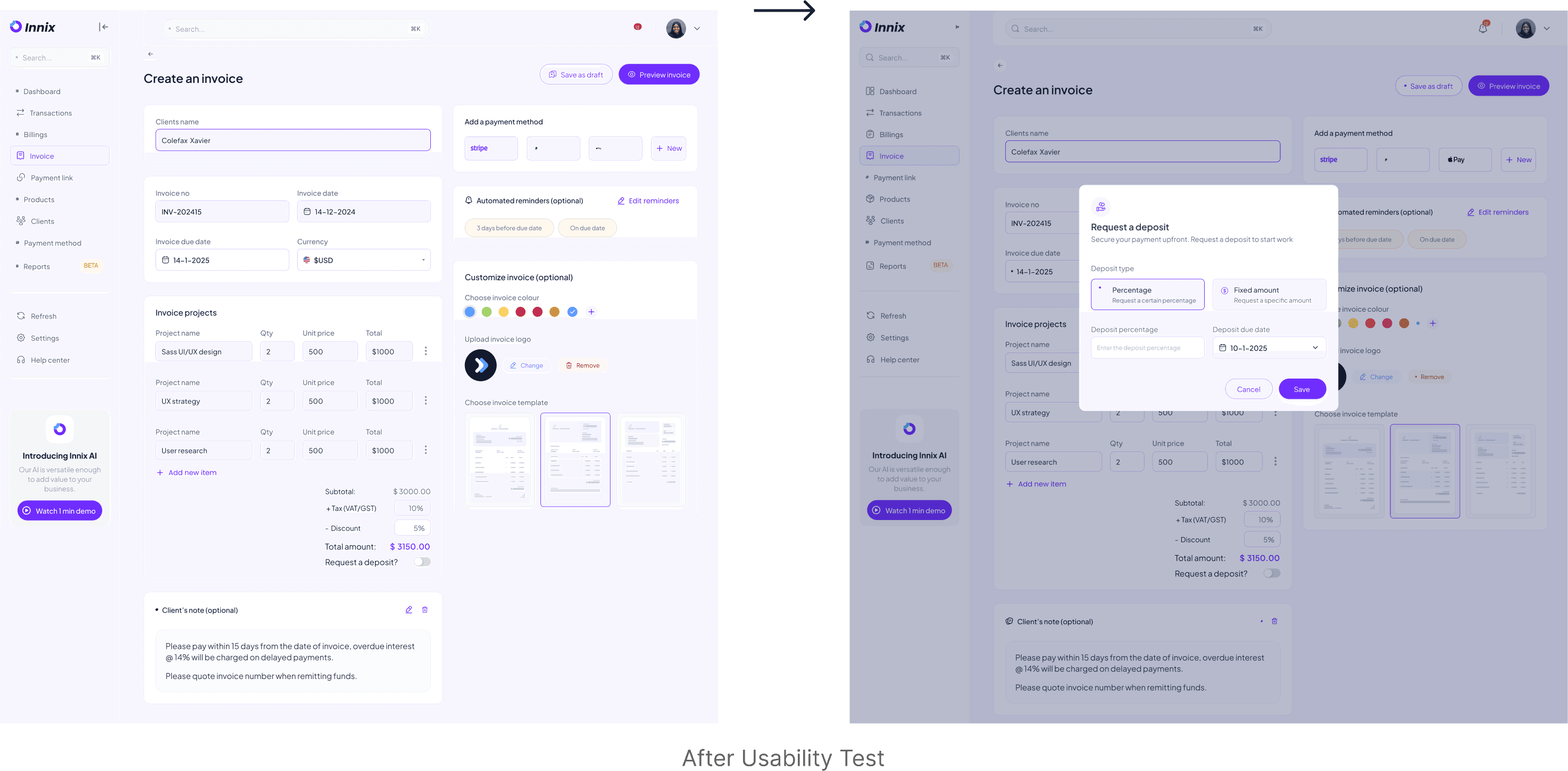
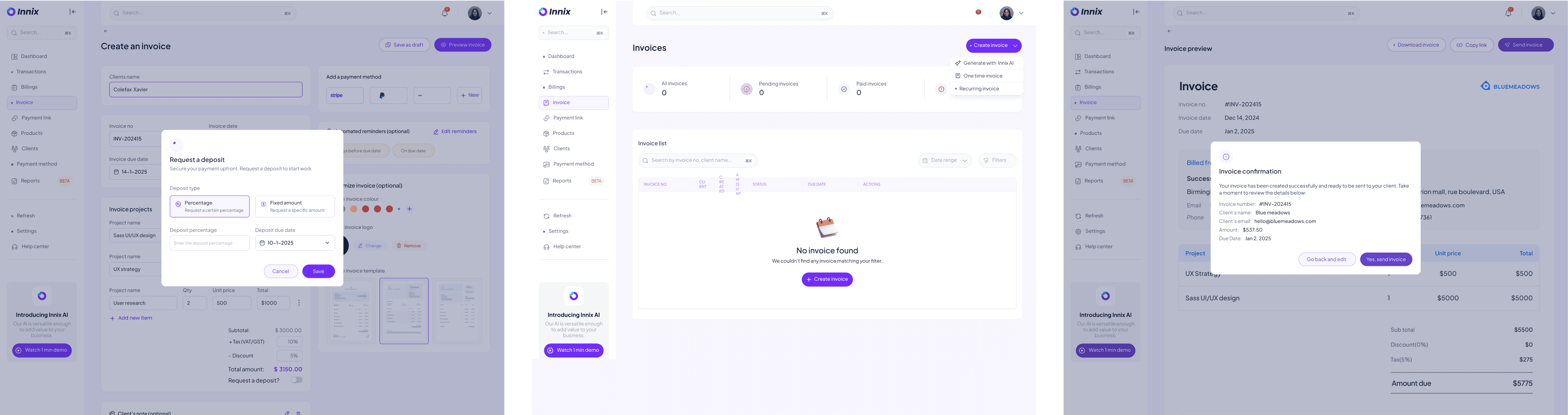
Iteration:I introduced a toggle switch for "Request a Deposit" directly in the invoice creation flow. When turned ON, a modal automatically appears, allowing users to input deposit details (percentage or fixed amount) and set a due date before finalizing the invoice. This reduces friction and ensures users can secure a deposit upfront.
Iteration:I introduced a toggle switch for "Request a Deposit" directly in the invoice creation flow. When turned ON, a modal automatically appears, allowing users to input deposit details (percentage or fixed amount) and set a due date before finalizing the invoice. This reduces friction and ensures users can secure a deposit upfront.
Key High-Fidelity Features
Key High-Fidelity Features
Key High-Fidelity Features
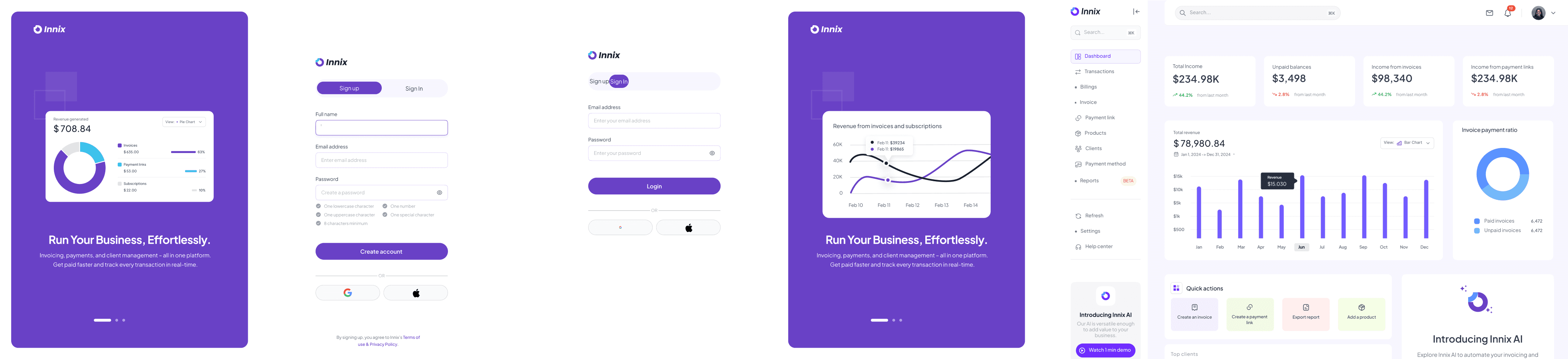
After multiple iterations and usability testing, I translated the refined wireframes into high-fidelity designs, ensuring a seamless and intuitive user experience.
After multiple iterations and usability testing, I translated the refined wireframes into high-fidelity designs, ensuring a seamless and intuitive user experience.
After multiple iterations and usability testing, I translated the refined wireframes into high-fidelity designs, ensuring a seamless and intuitive user experience.
AI-Powered Invoice Generation
AI-Powered Invoice Generation
AI-Powered Invoice Generation
What it does: Users can generate invoices using AI by either using voice commands or uploading an existing invoice image.
Why it matters: This feature saves time and reduces manual entry errors.
What it does: Users can generate invoices using AI by either using voice commands or uploading an existing invoice image.
Why it matters: This feature saves time and reduces manual entry errors.
What it does: Users can generate invoices using AI by either using voice commands or uploading an existing invoice image.
Why it matters: This feature saves time and reduces manual entry errors.
Request a Deposit or Partial Payment
Request a Deposit or Partial Payment
Request a Deposit or Partial Payment
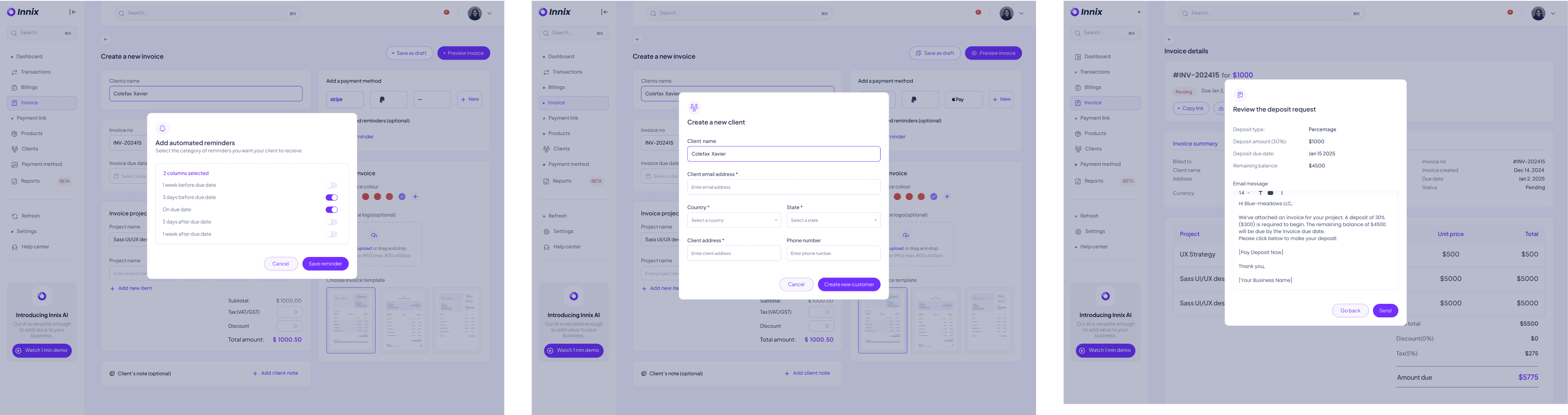
What it does: Users can request an upfront deposit when sending an invoice.
Why it matters: It improves cash flow and ensures commitment from clients.
Design Decision: The feature was integrated as a toggle switch within the invoice creation page. When enabled, a modal pops up prompting the user to enter the deposit amount and percentage.
What it does: Users can request an upfront deposit when sending an invoice.
Why it matters: It improves cash flow and ensures commitment from clients.
Design Decision: The feature was integrated as a toggle switch within the invoice creation page. When enabled, a modal pops up prompting the user to enter the deposit amount and percentage.
What it does: Users can request an upfront deposit when sending an invoice.
Why it matters: It improves cash flow and ensures commitment from clients.
Design Decision: The feature was integrated as a toggle switch within the invoice creation page. When enabled, a modal pops up prompting the user to enter the deposit amount and percentage.
Scheduled Invoicing
Scheduled Invoicing
Scheduled Invoicing
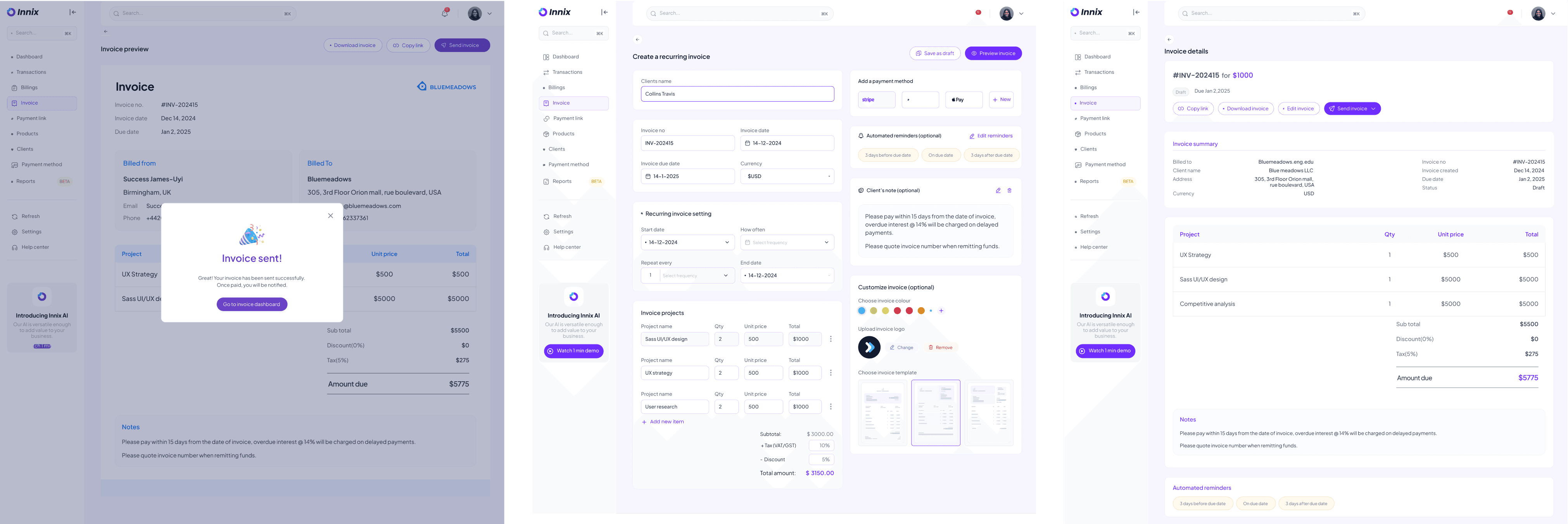
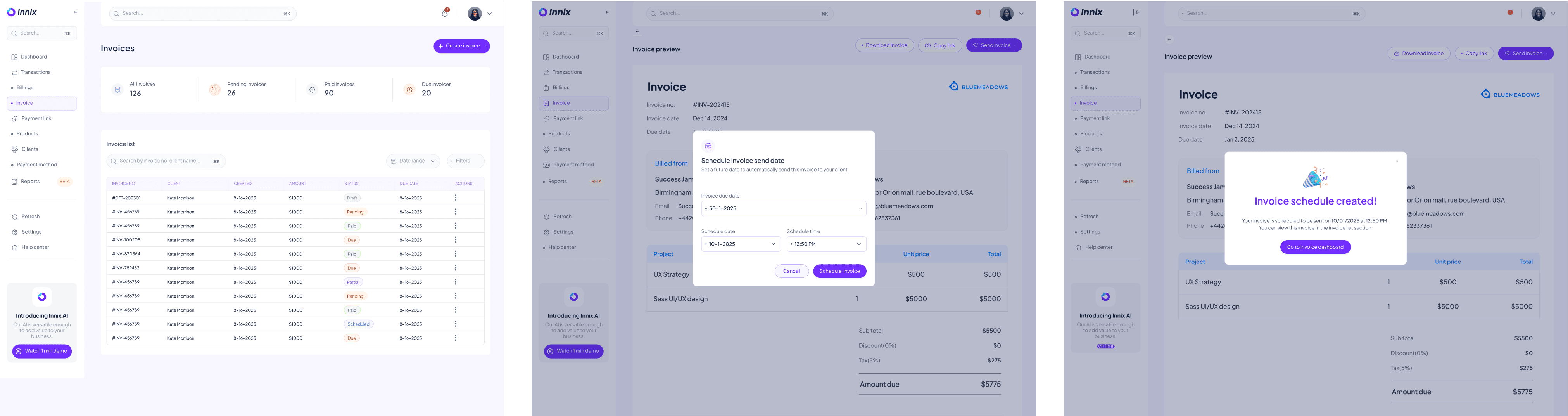
What it does: Users can set invoices to be sent at a later date.
Why it matters: This automates invoicing, reducing manual effort.
Design Decision: A calendar picker was implemented in the “Send Invoice” section, allowing users to select a preferred date.
What it does: Users can set invoices to be sent at a later date.
Why it matters: This automates invoicing, reducing manual effort.
Design Decision: A calendar picker was implemented in the “Send Invoice” section, allowing users to select a preferred date.
What it does: Users can set invoices to be sent at a later date.
Why it matters: This automates invoicing, reducing manual effort.
Design Decision: A calendar picker was implemented in the “Send Invoice” section, allowing users to select a preferred date.
Automated Payment Reminders
Automated Payment Reminders
Automated Payment Reminders
What it does: It sends automatic reminders to customers about unpaid invoices.
Why it matters: It reduces late payments and improves collection rates.
Design Decision: Users can select reminder frequency from a pop up menu while creating an invoice.
What it does: It sends automatic reminders to customers about unpaid invoices.
Why it matters: It reduces late payments and improves collection rates.
Design Decision: Users can select reminder frequency from a pop up menu while creating an invoice.
What it does: It sends automatic reminders to customers about unpaid invoices.
Why it matters: It reduces late payments and improves collection rates.
Design Decision: Users can select reminder frequency from a pop up menu while creating an invoice.
5. Manual Payment Recording
5. Manual Payment Recording
5. Manual Payment Recording
What it does: Users can manually mark an invoice as paid.
Why it matters: Helps businesses keep track of offline payments.
Design Decision: A “Mark as Paid” button was added within the invoice details, allowing users to enter payment details.
What it does: Users can manually mark an invoice as paid.
Why it matters: Helps businesses keep track of offline payments.
Design Decision: A “Mark as Paid” button was added within the invoice details, allowing users to enter payment details.
What it does: Users can manually mark an invoice as paid.
Why it matters: Helps businesses keep track of offline payments.
Design Decision: A “Mark as Paid” button was added within the invoice details, allowing users to enter payment details.
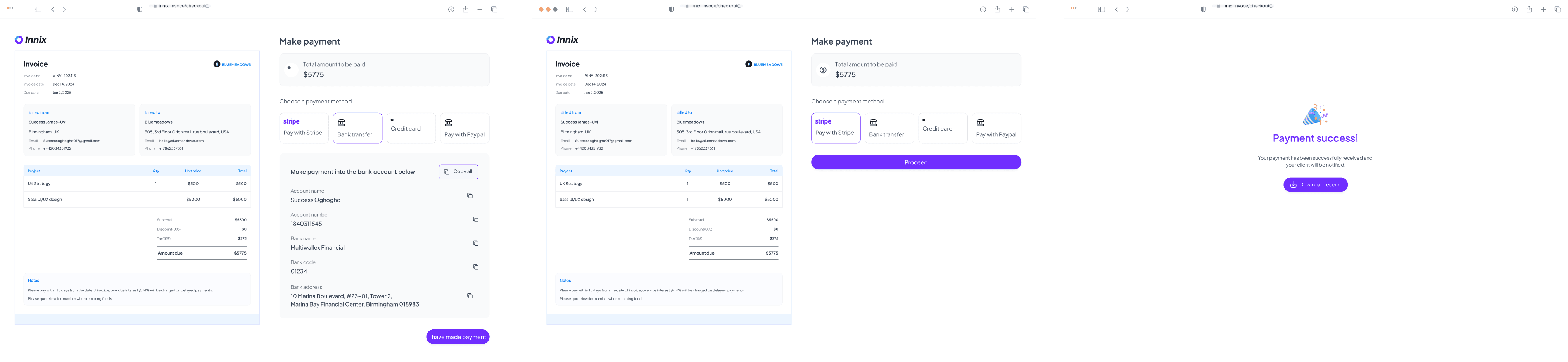
High fidelity screens
High fidelity screens
High fidelity screens
What I Learned While Designing Innix
What I Learned While Designing Innix
What I Learned While Designing Innix
Designing Innix was one of those projects that started off with “it’s just invoices, how hard can it be?” …and then humbled me real quick 😅. Turns out, when you’re designing for people who just want to get paid faster and look professional while doing it, every little detail matters. Here’s what I took away:
Designing Innix was one of those projects that started off with “it’s just invoices, how hard can it be?” …and then humbled me real quick 😅. Turns out, when you’re designing for people who just want to get paid faster and look professional while doing it, every little detail matters. Here’s what I took away:
Designing Innix was one of those projects that started off with “it’s just invoices, how hard can it be?” …and then humbled me real quick 😅. Turns out, when you’re designing for people who just want to get paid faster and look professional while doing it, every little detail matters. Here’s what I took away:
Simplicity is harder than it looks: I learned that the best designs are the ones that don’t make people think. Whether it was deciding where to put the “Request a deposit” toggle or how to visually separate scheduled vs. pending invoices, I had to constantly ask myself: “Can someone figure this out in 3 seconds or less?”
Real users will humble you fast: Some features I thought were super obvious? Yeah, users totally missed them. Watching them interact with the prototype was a great reminder that my brain is not the user’s brain.
People love flexibility—until it’s too much: Offering multiple ways to create invoices felt empowering… until I had to simplify things to avoid overwhelming users. Balance is everything.
Accessibility matters: I became way more thoughtful about colors, contrast, and navigation. Everyone deserves a smooth invoicing experience
Simplicity is harder than it looks: I learned that the best designs are the ones that don’t make people think. Whether it was deciding where to put the “Request a deposit” toggle or how to visually separate scheduled vs. pending invoices, I had to constantly ask myself: “Can someone figure this out in 3 seconds or less?”
Real users will humble you fast: Some features I thought were super obvious? Yeah, users totally missed them. Watching them interact with the prototype was a great reminder that my brain is not the user’s brain.
People love flexibility—until it’s too much: Offering multiple ways to create invoices felt empowering… until I had to simplify things to avoid overwhelming users. Balance is everything.
Accessibility matters: I became way more thoughtful about colors, contrast, and navigation. Everyone deserves a smooth invoicing experience
Simplicity is harder than it looks: I learned that the best designs are the ones that don’t make people think. Whether it was deciding where to put the “Request a deposit” toggle or how to visually separate scheduled vs. pending invoices, I had to constantly ask myself: “Can someone figure this out in 3 seconds or less?”
Real users will humble you fast: Some features I thought were super obvious? Yeah, users totally missed them. Watching them interact with the prototype was a great reminder that my brain is not the user’s brain.
People love flexibility—until it’s too much: Offering multiple ways to create invoices felt empowering… until I had to simplify things to avoid overwhelming users. Balance is everything.
Accessibility matters: I became way more thoughtful about colors, contrast, and navigation. Everyone deserves a smooth invoicing experience
Where are things now??
Where are things now??
Where are things now??
Innix is currently being built (yay! 🎉). The work isn’t done (is it ever?), I am working closely with the devs to bring the designs to life and keep things looking—and feeling—just as smooth as the Figma prototypes promised but seeing the product move into development is chef’s kiss satisfying. I’m proud of how far it’s come and can’t wait to see real users using it to get paid faster.
Innix is currently being built (yay! 🎉). The work isn’t done (is it ever?), I am working closely with the devs to bring the designs to life and keep things looking—and feeling—just as smooth as the Figma prototypes promised but seeing the product move into development is chef’s kiss satisfying. I’m proud of how far it’s come and can’t wait to see real users using it to get paid faster.
Innix is currently being built (yay! 🎉). The work isn’t done (is it ever?), I am working closely with the devs to bring the designs to life and keep things looking—and feeling—just as smooth as the Figma prototypes promised but seeing the product move into development is chef’s kiss satisfying. I’m proud of how far it’s come and can’t wait to see real users using it to get paid faster.
Thanks for reading up to this point. I know it was long 😄
Thanks for reading up to this point. I know it was long 😄
Thanks for reading up to this point. I know it was long 😄
I am the designer you need to bring
your ideas to life
I am the designer you need to bring your ideas to life
I am the designer you need to bring
your ideas to life
Get in Touch.
Get in Touch.
Get in Touch.
So we can talk more about...
So we can talk more about...
So we can talk more about...
c
2024 Success oghogho All rights reserved
2024 Success oghogho All rights reserved
Made with ❤️ by Success Oghogho
Made with ❤️ by Success Oghogho
c
2024 Success oghogho All rights reserved
Made with ❤️ by Success Oghogho